Viewing or Generate the Employee Location Report
Go to AanyaHR and login your account
Navigate the Admin report, select Employee and proceed on Emp Location Summary
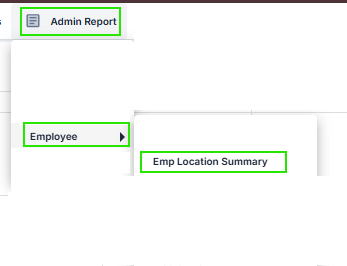
Fill up the filter needed such as Sub Company, Branch, Department, Employee Status, Employee, From Date and time and To Date and time

Click View Report

In this report, you will able to see the Employee Code, Employee Name, Date and Time movement, Latitude, Longitude, Mobile platforms (Android and iOS), version of the mobile application, Date created and Remark
Employee Code - The unique identification number assigned to an employee within the system.
Employee Name - The employee's full name displayed in the format Last Name, First Name, Middle Initial.
Date and Time - The date and exact time when the employee's location was captured or recorded by the mobile application.
Latitude - The geographic latitude coordinate of the employee's location at the time of capture. Latitude represents the north-south position on the Earth's surface.
Longitude - The geographic longitude coordinate of the employee's location at the time of capture. Longitude represents the east-west position on the Earth's surface.
Source - Indicates how the location data was captured.
Live | The location was captured and transmitted to the system in real time through the employee's mobile application. |
Offline | The location was captured while the device had no internet connection (mobile data or Wi-Fi was disabled or unavailable). The record is automatically synchronized and uploaded to the system once an internet connection is restored. |
Device - The mobile platform or operating system used to capture the location, such as Android, iOS, or Huawei.
Version - The version number of the mobile application installed on the employee's device when the location was recorded.
Date Created - The date and time when the location record was successfully created and stored in the system database.
Remarks - Displays additional information about the recorded location, including the GPS accuracy or validation status.
High Accuracy | Excellent GPS signal with a highly precise location. |
Medium Accuracy | Good GPS signal with acceptable location precision. |
Low Accuracy | Reduced GPS precision due to weak signal or environmental conditions. |
Poor/Rejected Accuracy | The captured location did not meet the required accuracy threshold and may not be reliable. |
Fake GPS Detected | The system detected that the device was using a mock or fake GPS location application. |
Sample report

6. You can also export this report as an Excel file by clicking the button and selecting Excel